Do I Need a VPN? A 60-Second Decision Tree, Including 'Probably Not'
Most people don't need a VPN all the time, and some don't need one at all. You do need one if you regularly use Wi-Fi you don't control, want to stop your internet provider seeing which sites you visit, or need an internet address in another country. If your real worry is being hacked, scammed or followed by ads, a VPN is the wrong tool, and cheaper fixes do more. The decision tree and the threat-by-threat table below show which group you're in.
In plain English: a VPN changes who can see where you go online and which country you appear to be in. It doesn't stop phishing, malware or account tracking. Buy one for the first job, not the second.
We publish this honestly because most pages answering this question are written to sell a subscription. We do earn a commission from some providers, and we'll name them where it matters, but the right answer for plenty of readers is no. If you're new to the idea, our plain-English explainer of what a VPN is covers the basics first.
The short answer
Ask what you want to change. A VPN does two things well: it seals your traffic from your device as far as the VPN server, so neither the local network nor your internet provider can read it or tell which sites you visit, and it gives websites the server's IP address instead of yours. If neither of those matters to you, a VPN adds cost, a little speed loss and another company holding your browsing data, and gives little back.
If you want the mechanism behind those two jobs, read how a VPN works. Here we stay practical.
The decision tree
Work down the four questions. A single yes is enough to make a VPN worth considering, but notice that the fourth question sends you away from a VPN, not towards one.
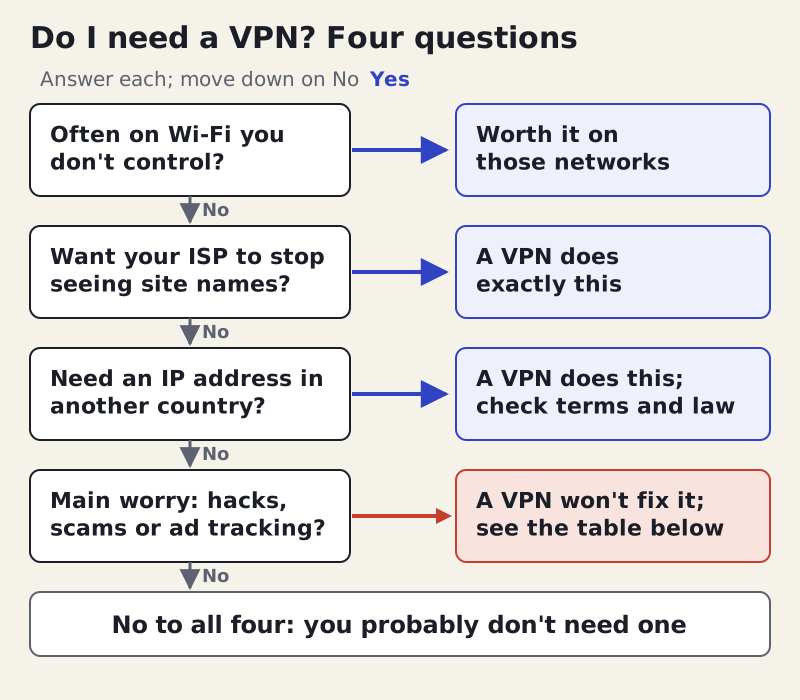
The first question is about networks run by strangers: cafés, hotels, airports, conference halls, a friend's flat. You can't see how those are set up or who else is on them, and a VPN means none of them can read your traffic or log the sites you visit. The second is about your own internet provider, which handles every DNS lookup and connection you make at home. The third covers travel, censorship and anything that checks your location by IP.
Threat by threat: what a VPN fixes and what fixes it better
The table lists the risks people usually mean when they ask whether they need a VPN, with an honest verdict for each and the tool that does the job better or alongside it.
| Threat | Does a VPN help? | Better or extra fix |
|---|---|---|
| Snooping on public Wi-Fi | Yes: everything is encrypted to the server | HTTPS already hides page contents; the VPN also hides site names |
| Your ISP logging the sites you visit | Yes: it sees one connection to the VPN | Encrypted DNS in your browser hides lookups only |
| Phishing and fake login pages | No | Password manager (won't fill on a fake site), passkeys, 2FA |
| Reused or leaked passwords | No | Password manager plus two-factor sign-in |
| Malware and ransomware | No | System updates, built-in security, care with downloads |
| Ad tracking across sites | Barely: your IP changes, cookies don't | Tracker blocking in the browser, clearing cookies |
| Sites knowing who you are after login | No | Separate accounts, or not logging in |
| Censored or blocked sites | Often, where using one is lawful | Tor; check the law where you are |
| Hiding from the VPN company itself | No: it sees your IP and site names | Tor, which spreads trust across relays |
Two rows deserve a second look. Phishing is the most common way people actually lose accounts, and a VPN does nothing about it: a fake bank page loads just as happily through a tunnel. A password manager helps more, because it fills your password only on the real domain, so a lookalike site gets nothing. And the ad-tracking row surprises people, because advertisers mostly follow you with cookies, logins and browser fingerprints rather than your IP address.
If you're on an iPhone, iPad or Mac and already pay for iCloud+, you may have a partial fix already. Apple's iCloud Private Relay covers all Safari browsing, unencrypted web traffic in other apps and your device's DNS lookups, according to Apple's own overview. It doesn't cover encrypted traffic from other apps, it can't make you appear in a different country, and it isn't offered in every country. For many people that is enough for café Wi-Fi without a separate subscription.
Where a VPN genuinely helps
Public and shared Wi-Fi
This is the strongest everyday case. Most sites use HTTPS now, so someone else on the café network can't read your bank balance, but the network can still see which sites you visit and can tamper with anything that isn't encrypted. A VPN closes both gaps between your device and the VPN server. If you work from cafés, travel often or stay in hotels, set the VPN to connect automatically on networks you don't trust.
Hiding your browsing from your ISP
Without a VPN, your home internet provider can see every site name you visit, through DNS lookups and the site name sent when a secure connection opens. With one, it sees only that you're connected to a VPN and how much data moves. The view doesn't vanish; it moves to the VPN provider, so this only helps if you trust that provider more than your ISP. Our explainer on what no-logs means covers how to judge that.
Travel and location
A VPN makes you look as if you're connecting from another country, which helps with banking apps that block foreign logins, home news sites behind regional walls, and services that change by location. Streaming services generally forbid this in their terms and block many VPN servers, so treat it as a convenience that may fail, not a right. In countries that restrict VPNs, check the rules first; our guide to whether VPNs are legal covers where they are restricted.
Work
If your employer gives you a VPN, use theirs for work. It connects you to the company network, which a consumer VPN can't do. It also means your employer, not a consumer provider, handles that traffic, which is one more reason to keep personal browsing off a work VPN.
Where a VPN doesn't help
A VPN doesn't make you anonymous. Websites still recognise you when you sign in, your browser still carries cookies and a fingerprint, and the VPN provider can see your real IP address. We explain the gap in do VPNs make you anonymous. It also doesn't protect a device that is already infected, doesn't stop you entering a password on a fake site, and doesn't hide anything you post publicly.
Some VPN apps bundle ad and malware blockers. Those can be useful, but they're separate features that happen to ship in the same app, and a dedicated blocker or your browser's own protection does the same job. Judge the VPN on its core job and the extras on their own merits.
Do you need a VPN at home?
On your own home network, usually not for security. Your router is yours, other people aren't sharing it, and HTTPS protects your logins. The case for a VPN at home is privacy from your internet provider, or a household where you don't control the router, such as shared student housing or a building-wide connection run by a landlord. If neither applies, a VPN at home mostly moves your browsing record from your ISP to the VPN company.
Phones are the exception people forget. A phone moves between home Wi-Fi, mobile data and unknown networks all day, and an always-on VPN covers the moments you don't think about. If you only take one step, protect the device that joins the most networks.
If you do need one: what to look for
Start with evidence that the provider doesn't keep logs, checked by an outside firm with a recent date. Two examples of what good evidence looks like: Deloitte examined NordVPN's no-logs claims between 10 November and 12 December 2025, in a report NordVPN announced on 3 February 2026 as its sixth, and Securitum's on-site inspection for Proton VPN ran from 20 to 27 May 2026, the fifth year in a row Proton has been audited. Then check for a kill switch, a modern protocol such as WireGuard and apps for every device you use.
Look at the price you'll pay in year two, not the headline monthly figure. Long plans are billed upfront at a discount and then renew at a higher yearly rate. The chart shows the yearly price each option renews at or charges as standard, read on 9 October 2026.
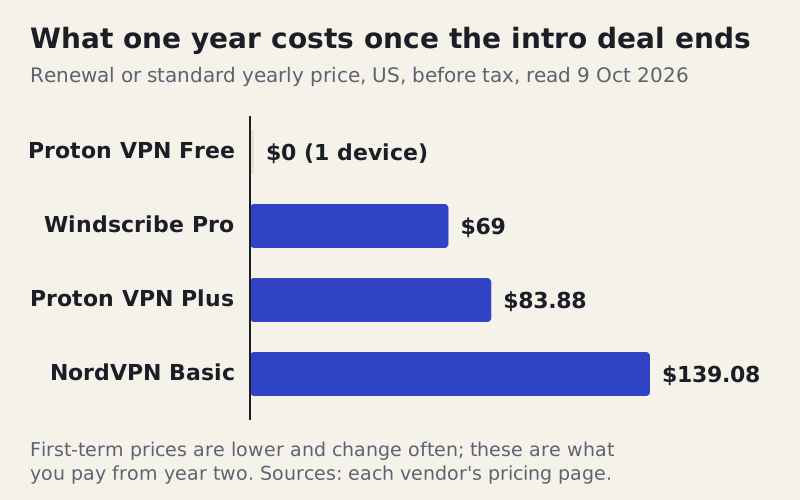
For the first term, Proton VPN Plus's two-year plan works out at $3.49 a month, billed $83.76 upfront, then renews at $83.88 a year; Windscribe Pro is $9 a month or $69 a year. NordVPN's Basic plan renews at $139.08 a year after its first term; check its current first-term price at checkout. Every figure is a US list price, excluding tax, as checked on 9 October 2026.
If you want to try one on the evidence above, Proton VPN offers a free plan without a data limit, for one device, with a server picked for you in one of 10 countries, which is a reasonable way to see whether you notice any difference. NordVPN offers a 30-day refund on first purchases. We earn a commission through those two links. Windscribe, which pays us nothing, also has a free tier: 2 GB a month, or 10 GB once you confirm an email address and accept a couple of promotional emails a month.
When the answer is 'yes, but not that one'
Needing a VPN doesn't mean any VPN will do. A VPN sees the same things your internet provider used to see, so a careless or dishonest one is worse than none. Free apps and browser extensions from companies you can't identify are the main risk, because someone pays for the servers, and if it isn't you it is often your data.
One documented case shows how this works. In December 2025, Koi Security reported, and The Register covered, that the browser extension Urban VPN Proxy and three related extensions, with more than 8 million users combined, captured users' conversations with AI chatbots and sent them to the company's analytics servers, whether or not the VPN was switched on. The extension's own Chrome Web Store listing, read on 9 October 2026, lists location, web history and website content among the data it collects. If a free VPN won't say who owns it or how it earns money, treat that as your answer.
How to check a VPN is doing its job
Once you've decided you need one, spend two minutes confirming it works on your own devices. Look up your public IP address with the VPN off, then on: the second result should show the VPN server's address and location, not yours. Then run a DNS leak test with the VPN on. If the test lists your internet provider's resolvers, your lookups are escaping the tunnel, which undoes most of the privacy you're paying for; our explainer on IP addresses and DNS shows what a clean result looks like.
Finally, check the kill switch: with it switched on, turn Wi-Fi off and on again and confirm nothing loads until the VPN reconnects. A VPN that passes these three checks is doing the job you bought it for. One that fails them is giving you a false sense of cover, which is worse than knowing you have none.
Edge cases
- Gaming: a VPN can change your region or hide your IP from other players, but it usually adds delay, and some games' terms forbid region changes.
- Torrenting: a VPN hides your IP from other peers, but it doesn't make infringing downloads legal.
- Children's devices: a VPN can bypass filters set on your home router, so parents managing filters should know it exists on a device.
- Banking: some banks flag logins from VPN servers. You can pause the VPN for that session, or use split tunnelling to leave the banking app outside the tunnel.
If a case like these is your only reason, you may need a VPN occasionally rather than permanently. A free tier from a reputable provider or a monthly plan you can cancel fits occasional use better than a two-year plan billed upfront.
Do I need a VPN? Quick answers
Do I need a VPN for everyday browsing?
Should I use a VPN on public Wi-Fi?
Why do people use a VPN?
Does a VPN protect me from hackers?
Do I need a VPN at home?
New here? Start with what a VPN is, explained plainly, or browse every explainer.