How does a VPN work?
A VPN encrypts each packet on your device, wraps it in an envelope addressed to the provider's server, and that server forwards your request under its own IP address. Here is one real request, traced step by step.
On this page
A VPN works by wrapping every packet your device sends in a second, encrypted envelope addressed to a server the VPN provider runs. That server opens the envelope, sends your request on to the website under its own IP address, and wraps the reply the same way on the return trip. Your Wi-Fi network and your internet provider carry those envelopes but can't read them; the VPN provider can, which is the trade you make. If the idea itself is new, start with what a VPN is; this page follows the machinery underneath, one real request at a time.
The 20-second answer: encrypt on your device, decrypt at the VPN server, and let the server talk to the internet for you. Your local network loses sight of where you go; the VPN provider gains it. Everything else is detail about how that envelope is built.
Most explanations stop at that summary. This one goes further and traces a single ordinary action, opening a web page, through each stage of the tunnel: the handshake that creates the keys, the DNS lookup, the moment the packet gets wrapped, the bytes that wrapping adds, and who along the route can see what. Where we give a number, it comes from the protocol's own documentation, read on 9 October 2026.
Step by step: what happens when you connect
Picture a laptop on café Wi-Fi with a VPN app installed. You press connect, then type a web address. Six things happen, most of them inside the first second. We'll use WireGuard, a protocol the major VPN apps now offer, because its design is published in full and is short enough to describe exactly.
Step 1: the handshake creates fresh keys
Before any of your traffic moves, the app and the server prove who they are and agree on keys. In WireGuard this is a single round trip: your device sends a 148-byte initiation message and the server replies with a 92-byte response. The pattern is called Noise IK, and the full construction WireGuard names is Noise_IKpsk2_25519_ChaChaPoly_BLAKE2s, which tells you the building blocks: Curve25519 for the key agreement, ChaCha20-Poly1305 for encryption, BLAKE2s for hashing. Each side combines its long-term key with a temporary one made just for this session, so a key stolen later can't unlock traffic recorded earlier.
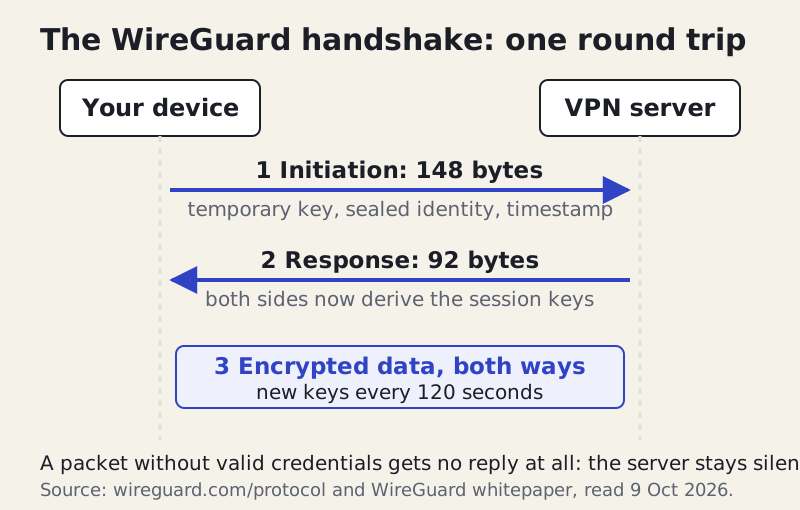
Two details in that exchange matter for privacy. WireGuard replaces session keys every 120 seconds and rejects keys older than 180 seconds, so even the short-term keys don't live long. And a server will not answer a packet that lacks valid credentials. To anyone scanning for it, a WireGuard server simply looks silent, which makes it harder to find and probe.
Step 2: the DNS lookup goes into the tunnel
You type example.com. Your device first has to turn that name into a numeric address, which is what DNS does. Without a VPN, that question usually goes in plain text to a resolver your internet provider runs, so the provider learns every site name you look up even when the pages themselves are encrypted. With a VPN connected, a well-built app sends the DNS question through the tunnel to a resolver the VPN provider operates. Your provider sees an encrypted packet; the VPN's resolver sees the question. If that lookup slips outside the tunnel instead, you have a DNS leak, which we cover in IP addresses and DNS explained.
Step 3: your packet is wrapped and sealed
Now the browser opens a secure HTTPS connection to the website. That connection is already encrypted between the browser and the site, so the VPN adds a second layer around it. The app takes the whole packet, header and all, encrypts it with the session key, attaches a 16-byte authentication tag that lets the server detect any tampering, and places the result inside a new packet addressed to the VPN server. This packet-inside-a-packet step is encapsulation, the idea behind every VPN tunnel.
Step 4: the network carries what it can't read
The wrapped packet leaves your laptop, crosses the café router, and travels through your internet provider to the VPN server. Every device on that route can read the outer label: a UDP packet from your connection to the server's address, conventionally on port 51820 for WireGuard. None of them can read the inside. They can still count packets and measure timing, which is why we say a VPN hides what you do, not that you are doing something.
Step 5: the server unwraps and forwards
At the VPN server the process runs in reverse. The server checks the tag, decrypts the inner packet, and finds your original request to example.com. It then swaps your tunnel address for its own public IP and forwards the request onto the open internet. From the website's point of view, the visitor is the VPN server. This is the moment your IP address changes, and also the moment the provider is in a position to see where you are going.
Step 6: the reply retraces the route
The website answers the server, the server encrypts the reply with the session key, wraps it for your connection, and sends it back down the tunnel. Your app unwraps it and hands the inner packet to the browser, which decrypts its own HTTPS layer and draws the page. The round trip took a little longer than it would have without the VPN, because of the detour through the server and the work of sealing and opening each packet.
What a VPN packet looks like: headers and overhead
Encapsulation has a measurable cost, and WireGuard publishes enough of its format to calculate it exactly. Every data packet gains a 20-byte outer IPv4 header, an 8-byte UDP header, WireGuard's own 16-byte header (a message type, the receiver's index and a counter), and a 16-byte Poly1305 tag at the end. That adds up to 60 bytes per packet, or 80 if the outer header is IPv6.
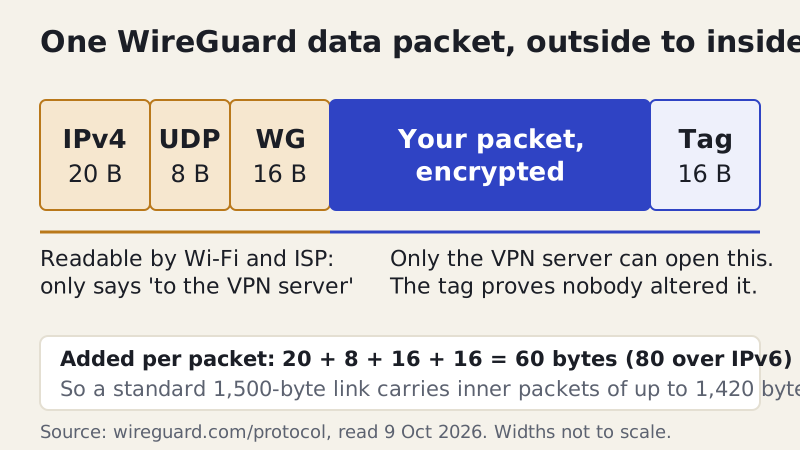
Those 60 to 80 bytes are why WireGuard interfaces usually set their maximum packet size to 1,420 bytes on a normal 1,500-byte link: the wrapper has to fit somewhere. On a full-size packet the wrapper is a few per cent of the payload, which is part of why a nearby WireGuard server feels close to your normal speed. OpenVPN's wrapper is generally larger than WireGuard's, but its exact size depends on the cipher, the transport and the options a provider picks, so there is no single honest byte count to quote.
The counter in the header matters too. Each packet carries a number that only goes up, so the server can refuse a copy of an old packet that someone records and replays later. Encryption hides the contents; the tag and counter make sure what arrives is what you sent, once.
What the encryption is actually doing
Two kinds of cryptography share the work. The handshake uses public-key maths (Curve25519 in WireGuard) so that two parties who have never shared a secret can agree on one over an open network. After that, bulk data uses a fast symmetric cipher with the agreed key: ChaCha20-Poly1305 in WireGuard, usually AES in OpenVPN. Symmetric ciphers are what make it practical to encrypt every packet of a video stream without draining a phone battery. We go deeper, without the maths, in VPN encryption basics.
Notice what the encryption protects: the stretch between your device and the VPN server. It does not reach past the server. Once your request leaves the far end of the tunnel, any protection comes from the website's own HTTPS, exactly as it would without a VPN.
Inside your device: the virtual network adapter
Pressing connect also changes your device's own plumbing. The VPN app creates a virtual network adapter, a software network card that behaves like Wi-Fi or Ethernet but leads into the app instead of out to the router. It then edits the routing table, the list your operating system checks to decide where each packet goes, so that internet-bound traffic heads for the virtual adapter. Packets arriving there are the ones the app encrypts and wraps.
The app usually changes your DNS settings at the same time, pointing lookups at the provider's resolver, and adds one exception to the routing table: packets addressed to the VPN server itself must still go out through the real Wi-Fi adapter, or the wrapped traffic would loop back into the tunnel. When you disconnect, the app undoes these changes. Most leaks and odd connection problems trace back to one of these edits failing or being overridden by another program, such as a second VPN or a security suite that also wants to control routing.
What your ISP sees versus what the VPN sees
The clearest way to understand a VPN is to list everyone along the route and what each can observe. The answer changes in a specific way when you switch the VPN on: visibility doesn't disappear, it moves.
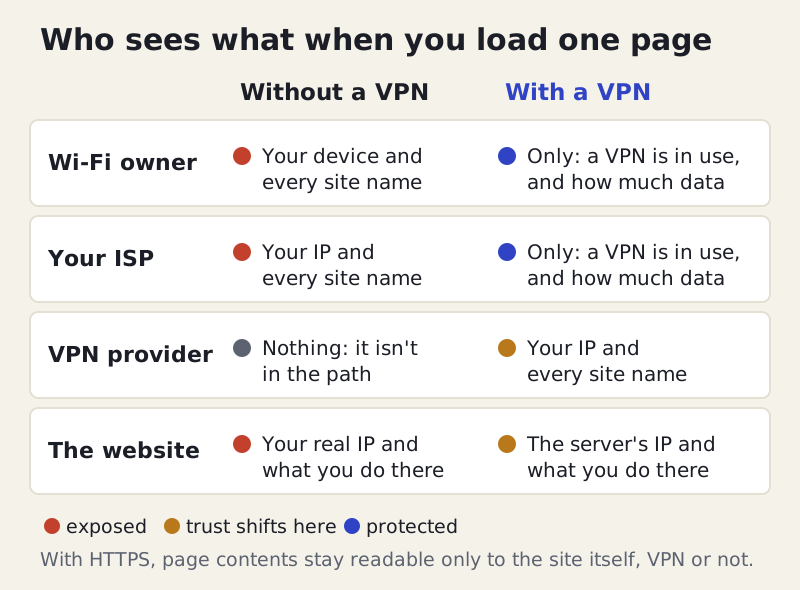
Without a VPN, the café's Wi-Fi owner and your internet provider can see your device's address and the name of each site you visit, from DNS lookups and from the site name your browser announces when it opens an HTTPS connection. They can't read the page contents when HTTPS is on. The website sees your real IP address.
With a VPN, the Wi-Fi owner and your provider see one encrypted stream to one server, its size and its timing. The website sees the server's address. The VPN provider now holds the view your internet provider used to have: your real IP and the sites you reach. That is why the provider's logging policy, and independent checks of it, decide whether a VPN improves your privacy or merely relocates the risk; see what no-logs means.
And the website still knows everything you do once you're on it. If you sign in, it knows who you are regardless of the address you arrived from, which is the main reason a VPN does not make you anonymous.
Where the tunnel ends, and why that matters
The tunnel has two ends, and each one is a point of trust. One end is your device: if the app is badly built, or something on your computer reads traffic before it is encrypted, the tunnel can't help. The other end is the VPN server, where your traffic is decrypted, given a new address and released. Everything after that is ordinary internet traffic.
This is where provider choice stops being abstract. Some providers have had their no-logs claims checked by outside firms, and the useful thing is to read who checked, and when. NordVPN announced its sixth independent no-logs assurance report, by Deloitte, on 3 February 2026, covering fieldwork from 10 November to 12 December 2025. For Proton VPN, Securitum's fifth yearly no-logs audit included an on-site inspection at Proton AG in Zurich between 20 and 27 May 2026. An audit is a snapshot of one period, not a guarantee for the future, so check that the latest report is recent before you rely on it.
If you are choosing on the strength of that evidence, NordVPN and Proton VPN are two audited options; Proton also has a free tier limited to one device. We earn a commission if you buy through those links. Mullvad, which pays us nothing, is another provider that publishes its third-party audits. Before you pay for any of them, compare renewal prices as well as first-term prices: NordVPN's Basic plan, for instance, costs $139.08 a year at renewal in the US (as of 9 Oct 2026, before tax).
Protocols: the rules the tunnel follows
The steps above describe WireGuard, but the same six-stage journey applies to every VPN protocol; what changes is how the handshake works, which ciphers are used and how the envelope is built. The table compares the two you are most likely to meet, using figures from each project's own documentation.
| WireGuard | OpenVPN | |
|---|---|---|
| Handshake | Noise IK, one round trip, 148 + 92 bytes | TLS-based control channel; more messages |
| Data cipher | ChaCha20-Poly1305, fixed | Configurable; usually AES |
| Per-packet overhead | 60 bytes (IPv4), 80 bytes (IPv6) | Larger; varies with settings |
| Usual port | UDP 51820 (convention, not IANA-assigned) | 1194 TCP/UDP (IANA-registered) |
| Key rotation | Every 120 seconds | Set by configuration |
| Code size | Under 4,000 lines (Linux, per whitepaper) | Much larger, long-reviewed codebase |
| First release | 1.0.0 in Linux 5.6, 29 Mar 2020 | 2001 private, 2002 public |
IKEv2/IPsec is the third common option, popular on phones because an extension called MOBIKE lets a connection survive a switch between Wi-Fi and mobile data. It uses UDP ports 500 and 4500. Some providers also run their own WireGuard-based protocols, such as NordVPN's NordLynx. For the full trade-offs, read VPN protocols explained.
One change is already rolling through these handshakes: post-quantum key exchange, meant to protect today's recordings from tomorrow's quantum computers. ExpressVPN says its Lightway protocol now includes ML-KEM by default. NordVPN offers post-quantum protection on NordLynx only, and you switch it on in the app's settings. The bulk ciphers themselves are not the worry; the key agreement is.
Where a VPN can leak
A tunnel only protects what goes into it. Three gaps undo the journey above. A DNS leak sends the step-2 lookup outside the tunnel to your provider's resolver. An IPv6 leak happens when your connection has IPv6 but the tunnel handles only IPv4, so some traffic takes the unprotected route. A WebRTC leak lets a browser feature reveal your real address to a page that asks.
The fourth failure is simpler: the tunnel drops. Wi-Fi blips, the laptop sleeps, the server restarts, and for a few seconds your apps send traffic the ordinary way. A kill switch blocks traffic until the tunnel is back. Apps that let some programs bypass the tunnel on purpose, called split tunnelling, create a deliberate gap you should know about.
Edge cases worth knowing
- Work networks: a company VPN often sends only office-bound traffic through the tunnel, so your personal browsing may not be covered at all.
- Captive portals: hotel and airport Wi-Fi sign-in pages need the tunnel down for a moment, which is a brief exposure a kill switch may block entirely until you sign in.
- Blocked ports: some networks block UDP or unusual ports; WireGuard then fails to connect and apps fall back to another protocol, often on TCP 443.
- Double encryption: an HTTPS site inside a VPN is encrypted twice on the first leg. That is normal, and it is why the VPN provider still can't read your passwords on an HTTPS site.
None of these should put you off a VPN; they are reasons to know which part of the journey each feature protects. The tunnel is very good at one job: keeping the networks between you and the server from reading or altering your traffic. It moves the trust you used to place in your internet provider onto the VPN provider, and the rest of your privacy depends on what you do at the far end.