What Is a VPN Server? What It Does With Your Traffic, and Who Runs It
A VPN server is a computer run by your VPN provider that sits at the far end of your encrypted tunnel. It receives your scrambled traffic, unlocks it, forwards your requests to websites using its own IP address, then encrypts the answers before passing them back to you. Everything a VPN promises happens on that machine, which is why it is worth knowing who owns it, what it keeps and how many strangers share it with you.
In plain English: the VPN server is the provider's computer that speaks to the internet on your behalf. Websites see the server, your internet provider sees a sealed stream to the server, and the server itself sees where you go. Choosing a VPN is mostly choosing whose server you trust.
If the idea of a VPN is new to you, start with our explainer of what a VPN is. This page looks only at the server end: what it does, what it can see, where it physically sits and how providers try to make it forget. Vendor details below come from each provider's own pages, read on 18 October 2026.
What a VPN server does with your traffic
A VPN server has four jobs, and it repeats them for every packet you send. First it checks that the packet really came from a customer holding a valid key; anything else is dropped. Second it decrypts the packet to recover your original request. Third it puts its own public address on the request in place of your tunnel address and sends it on to the website. Fourth it takes the website's reply, encrypts it with your session key and sends it back down the tunnel.
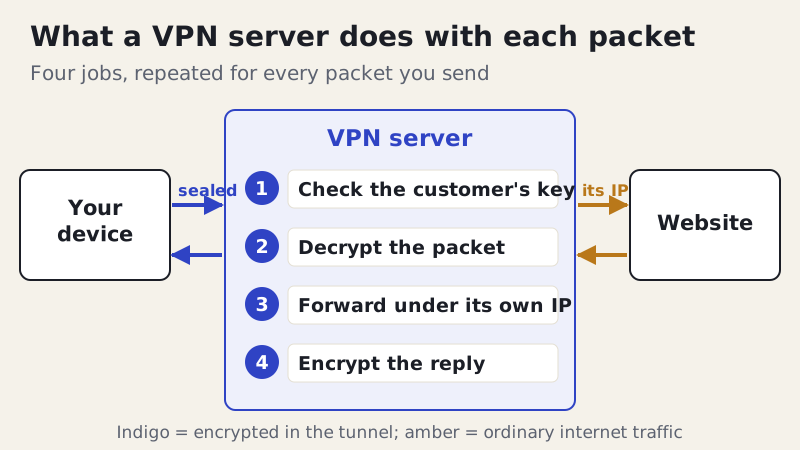
Most VPN servers also run a DNS resolver, which turns site names into numeric addresses, so a well-built app sends your lookups to the provider instead of your internet provider. For the full journey, handshake included, see how a VPN works.
What the server can see, and what it can't
Because the server is where your traffic is decrypted, it is the one place on the route with a clear view of your connection. It knows the real IP address you connected from, the time and length of each session, how much data moved, and the destination of each request: the IP address of the site and, from DNS lookups and the site name your browser reveals while setting up an encrypted connection, usually the site's name too.
What it normally can't see is the content of encrypted web traffic. When a site uses HTTPS, the page, your password and your messages are sealed between your browser and that site, and the VPN server only passes the sealed bytes along. Unencrypted traffic is a different matter: anything sent without HTTPS is readable on the server. That visibility is the reason logging policies matter, and why we explain what no-logs actually means on a separate page.
Shared IP addresses: why you look like hundreds of people
On most VPN services, many customers leave the same server through the same public IP address at the same time. Websites see one address making requests for a crowd. That is good for privacy, because your activity blends with everyone else's, and it is the reason your browsing can't simply be tied to one customer by IP address alone.
The crowd has side effects. Sites that see heavy traffic from one address tend to show more CAPTCHAs, ask you to confirm sign-ins, or block the address altogether, and streaming services keep lists of addresses that belong to VPN providers. Some providers sell a dedicated IP, meaning an address reserved for you alone, to avoid this. NordVPN's support pages, for instance, mention a dedicated IP option and note that its post-quantum encryption is switched off while you use one. The trade is clear: a personal address is less likely to be blocked, and easier to link back to you.
Where the server really is
The country you pick in a VPN app is the country websites will believe you are in. It is not always where the hardware sits. Some providers run virtual locations: servers that hand out an IP address registered to one country while the machine is physically elsewhere. Proton VPN calls its version Smart Routing and says it uses it to offer countries where running servers locally would be impossible or less safe; it replaced its physical servers in India this way. Proton says these servers run on its own bare-metal machines.
Ownership varies too. Most providers rent servers in data centres rather than owning the hardware outright. Mullvad publishes its whole server list with an ownership column marking each machine as owned or rented, and on 18 October 2026 that list showed 566 servers in 50 countries and 91 cities, run with 14 hosting providers. Few providers publish this much, so treat a vague answer to "who owns your servers?" as a gap, not a reassurance.
RAM-only servers versus encrypted disks
What happens to a server's data when someone unplugs it is the question behind the phrase "RAM-only". RAM is working memory that empties when the power goes off. A RAM-only server boots from a read-only image and never writes logs or files to a disk, so a machine seized while switched off holds nothing to recover. Providers disagree, in public, about how much that matters.
| Provider | Server storage | What the provider says |
|---|---|---|
| Mullvad | Diskless (RAM-only) | Finished removing all disks from its VPN infrastructure, announced 20 Sep 2023 |
| ExpressVPN | RAM-only (TrustedServer) | All data wiped with every reboot; the drive holds only a read-only, signed image |
| Surfshark | RAM-only | States 100% RAM-only servers, with all data wiped on every reboot |
| Proton VPN | Hard disks, fully encrypted | LUKS full-disk encryption with AES-256; keys kept off the server |
Proton's argument is worth hearing because it cuts against the marketing. It points out that a running server exposes whatever is in memory to anyone who gains control of it, RAM-only or not, and that a fully encrypted disk is unreadable once powered off, just like empty memory. Both designs protect a switched-off machine; neither protects a live one from a determined intruder.
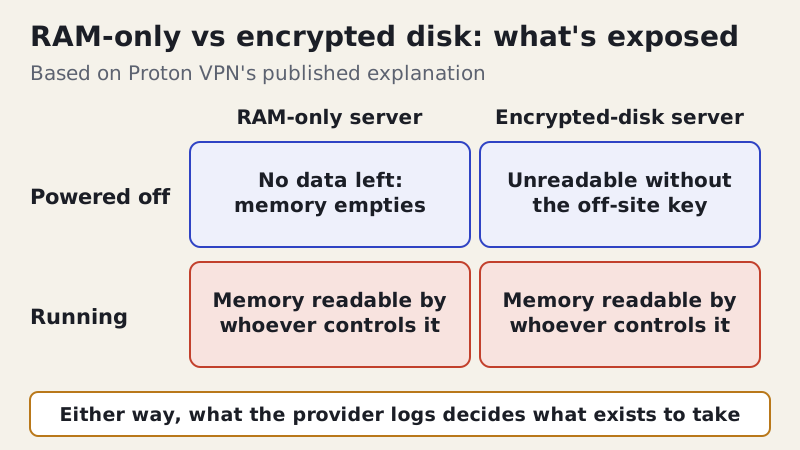
The practical lesson is that storage design is one input, not the verdict. What decides whether your data exists to be taken is what the provider chooses to log in the first place, which is why outside checks matter more than server hardware.
Can you run your own VPN server?
Yes, and plenty of people do, on a home router, a small computer at home or a rented cloud server. It changes the trust question rather than removing it. A server at home lets you reach your home network and use your home IP address while travelling. A rented cloud server hides your browsing from the local network and your internet provider, but every request leaves through an address that only you use, rented in your name, so websites can recognise you just as easily as before. A self-run server gives you control over logs; it does not give you the crowd that a commercial server provides. Nor does it make you anonymous; see do VPNs make you anonymous?
Edge cases worth knowing
- A server address in your app's settings is just the hostname or IP your app connects to. You only need it for manual setups, such as a router or a built-in operating system client.
- Free VPNs run servers too, and someone pays for them. If the business model isn't a subscription, ask what the server is collecting instead.
- Corporate VPN servers work the same way but answer to your employer, who can usually see the traffic they carry.
- Switching servers changes your apparent country and IP address, not the company that can see your traffic.
Choosing a provider by its servers
Look for three things before you trust a provider's servers: a published independent check of its logging claims, a clear statement of how servers store data, and honest answers about virtual locations. NordVPN says Deloitte carried out its sixth independent no-logs assurance engagement, with fieldwork reported as running from 10 November to 12 December 2025; NordVPN announced the result on 3 February 2026. Proton VPN's fifth annual no-logs audit by Securitum included an on-site inspection in Zurich from 20 to 27 May 2026. An audit describes one period; check the date before relying on it. If either suits you, NordVPN and Proton VPN are affiliate links, so we earn a commission if you subscribe. Mullvad, which publishes its server ownership and pays us nothing, is worth a look too.
VPN servers: quick answers
What is a VPN server in simple terms?
How does a VPN server work?
Can a VPN server see my passwords?
Are RAM-only VPN servers safer?
Why do so many people share one VPN server IP?
New here? Start with what a VPN is, explained plainly, or browse every explainer.